

Choosing the Best Home Entertainment Projector: A 2026 Buying Guide for Aussies
You don't need to fork out thousands for a bulky 98-inch TV just to get that front-row feeling at the footy. Most Aussies reckon a proper home entertainment projector is only for tech heads with massive budgets and dedicated theatre rooms. It's easy to feel overwhelmed by confusing specs like ANSI lumens, throw distances, and "4K decoding" versus native resolution. You just want a crisp, bright picture for movie night without a mess of tangled cables or a complicated installation process.
We hear you. This guide simplifies the 2026 tech landscape so you can bring the big-screen experience home without the premium price tag. You'll discover how to choose a setup that works in your actual lounge room, even if you aren't a technical expert. We'll break down the essential features needed for daytime viewing and show you why portable, smart-enabled devices are the no-brainer choice for a fair dinkum cinema experience.
Key Takeaways
- Learn how to score a massive screen for a fraction of the cost by mastering the "inches-per-dollar" advantage over bulky TVs.
- Cut through technical jargon to spot the vital difference between native and supported resolution for a truly high-definition image.
- Find out why picking a home entertainment projector with built-in smart apps and Wi-Fi 6 is the key to a hassle-free, cable-free setup.
- Discover why the portable Hy300 4K is the savvy choice for Aussies who want a plug-and-play cinema experience anywhere in the house.
What is a Home Entertainment Projector and Why Your TV is Worried
A home entertainment projector isn't just a fancy torch; it's a high-definition powerhouse that beams visuals directly onto your wall or a dedicated screen to create a massive display. While your old man might remember noisy, hot boxes in the office, modern video projection technology has flipped the script. These days, a home entertainment projector provides an immersive, stadium-sized experience that makes even the biggest 85-inch TVs look like a postage stamp. It's about bringing that "Gold Class" feel into your lounge room without the hefty price tag or the need for a professional installer.
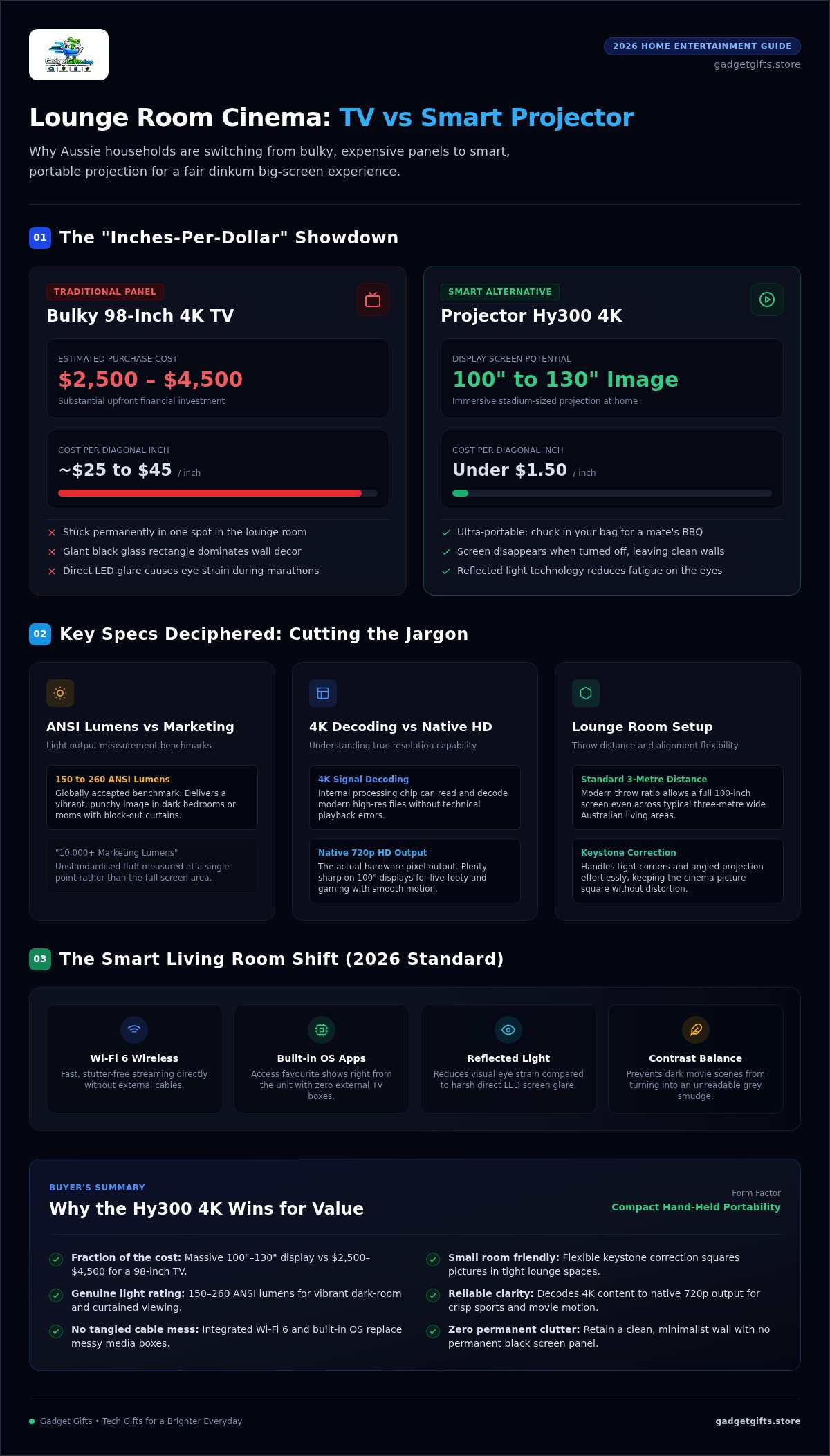
The real kicker is the "inches-per-dollar" advantage. In Australia, a massive 98-inch 4K TV can set you back anywhere between $2,500 and $4,500. That is a lot of dollarydoos for a screen that is stuck in one spot. Choosing a savvy alternative like the Projector Hy300 4K allows you to enjoy a 100-inch to 130-inch image for a fraction of that investment. The entry price per diagonal inch for this category of tech is often under $1.50, compared to roughly $25 to $45 per inch for those giant glass panels. It's smart consumerism at its finest.
The Shift from Cinema Halls to Lounge Rooms
Technology has shrunk high-end components into portable units you can hold in one hand. We've moved past the era of messy cables and external media boxes that required a technician to set up. By 2026, smart integration became the standard for Aussie homes. Modern units now feature built-in operating systems, so you can stream your favourite shows directly from the device via Wi-Fi 6. It's a true plug-and-play solution that has finally made projectors a viable TV replacement for the everyday household.
Projector vs. TV: The Living Room Showdown
The versatility here is unmatched. You can't exactly lug a 100-inch TV to a mate's BBQ for the grand final, but you can chuck a portable projector in your bag and set it up in seconds. Beyond portability, there's the health factor. Projectors use reflected light, which is often much easier on the eyes than the direct LED glare of a traditional panel. This reduces eye strain during those long weekend movie marathons. Plus, when the show is over, you aren't left with a giant black rectangle dominating your decor. Your screen simply disappears, leaving you with a clean, minimalist wall.
Key Specs Deciphered: Understanding Lumens, Resolution, and Contrast
Shopping for a home entertainment projector often feels like sitting a year 12 maths exam you didn't study for. You're hit with technical numbers that don't seem to make sense. Understanding these basics is the difference between a crisp cinema night and a blurry, washed-out mess. You only need to focus on a few key pillars to get the best result for your space, ensuring your home entertainment projector delivers the goods every single time.
Lumens and Light: Finding the Sweet Spot
Brightness is measured in lumens, but not all ratings are fair dinkum. You'll see "marketing lumens" claiming 10,000+, but these are often unstandardised fluff. Look for ANSI lumens instead. This is the globally accepted benchmark for usable light output. For a dark bedroom or a lounge room with block-out curtains, 150 to 260 ANSI lumens provides a vibrant, punchy image. This measurement is more reliable because it accounts for the entire screen area, not just a single bright point in the middle. As highlighted in CNET's home projector guide, managing your room's ambient light is just as vital as the hardware itself.
Native Resolution: Why it Matters for Your 4K Content
This is where many shoppers get tripped up. Many budget units claim "4K Support," but this just means the internal chip can decode a 4K signal. It doesn't mean it displays at that resolution. Native Resolution is the actual number of pixels the projector can produce. A savvy choice like the Projector Hy300 4K decodes high-res files but outputs at a crisp 720p HD. This is still plenty sharp for a 100-inch screen, especially for live sports and gaming where smooth motion is king. Don't be fooled by labels; always check the native output to ensure you're getting the clarity you expect.
Contrast ratio is the secret to seeing what's actually happening in dark movie scenes. It represents the difference between the brightest whites and the darkest blacks. Without a decent ratio, your favourite thrillers will look like a grey smudge. You should also check the throw distance. This tells you how far the unit needs to be from the wall to hit a 100-inch image. Most modern units have a throw ratio that allows for a massive screen even in a standard three-metre wide lounge. If you're in a smaller apartment, look for a device with flexible keystone correction to keep the picture square. A versatile option like the Hy300 4K handles tight corners with ease, making it a top pick for renters who can't mount hardware to the ceiling.
Smart Features: The Difference Between a Basic Unit and a Home Cinema
A basic projector just shows a picture, but a modern home entertainment projector acts as the brain of your entire lounge room. We've moved past the days of needing a separate laptop or a tangled mess of media players just to watch a movie. High-quality units now come with built-in operating systems like Android, giving you direct access to apps like YouTube and Prime Video without any extra hardware. This all-in-one approach turns a simple device into a proper home cinema that even the least tech-savvy person can operate with a single remote.
Connectivity is where the real magic happens in 2026. You should look for a unit equipped with Wi-Fi 6 for lag-free streaming, especially if you're watching live sports or high-bitrate movies. Wireless casting is another essential; it lets you mirror your phone or laptop screen instantly. You can share holiday photos or TikTok clips with the whole room without faffing about with cords. While a standard HDMI port is still vital for gaming consoles, the freedom of a wireless setup is a total game changer for most Aussie homes.
One of the best "quality of life" upgrades is auto-correction technology. Setting up a projector used to involve endless tweaking to get the image square and sharp. Now, features like Auto-Keystone and Auto-Focus do the hard work for you. If you bump the unit or move it to a different room, it automatically re-aligns the image to fit your wall perfectly. It's a no-brainer for renters who might need to set up on a coffee table rather than a permanent ceiling mount.
The Rise of AI-Enhanced Visuals
Modern units use AI-driven upscaling to make standard definition content look surprisingly sharp. This technology analyses every frame to improve clarity, making older movies look fresh on a 130-inch display. Because these smart projectors handle so much internally, you can keep your space minimalist. You won't need a drawer full of converters or extra 240W fast charging cables just to keep accessories powered up. It's a cleaner, smarter way to build a theatre.
Audio Integration: Internal Speakers vs. Bluetooth
Sound is half the experience. Most compact projectors include a built-in speaker which is fine for a quiet bedroom, but for a fair dinkum movie night, you'll want more punch. Look for Bluetooth 5.0 support so you can wirelessly link the unit to your existing soundbar or a pair of high-end headphones. Also, pay attention to "quiet fan technology." You want to hear the dialogue in a thriller, not the constant hum of a cooling fan. A smart home entertainment projector balances high performance with a whisper-quiet operation.
Practical Selection Guide: Matching the Projector to Your Space
Aussie homes aren't usually built like windowless cinema bunkers. We love our open-plan living areas, massive sliding doors, and natural light. While these features are great for a Sunday barbie, they can be a bit of a challenge for a traditional theatre setup. You don't need to renovate your house to make a home entertainment projector work. It is simply a matter of being smart with your layout and choosing hardware that adapts to your lifestyle rather than demanding a dedicated dark room.
First, look at your walls. A flat, matte white wall is a perfect "free" screen for most people. If your walls are a dark colour or have a heavy texture, a simple pull-down or portable screen will significantly boost your contrast. For placement, forget about expensive ceiling mounts that require a sparky to install. Modern, lightweight units work brilliantly on a tripod or just sitting on the coffee table. This portability is a massive win; you can watch the footy in the lounge and then move the unit to the backyard for a movie night under the stars once the sun goes down.
Measuring Your Room for Success
Calculating your throw distance doesn't require a maths degree. Most versatile projectors need roughly three metres of space to beam a 100-inch image. To get the best view, try to sit about 1.5 to 2 times the screen's diagonal distance away. This sweet spot ensures the image fills your field of vision without making you squint at individual pixels. Just keep an eye out for obstacles like low-hanging pendant lights or ceiling fans that might cut off the bottom of your movie.
Managing Ambient Light in Aussie Homes
Our harsh afternoon sun is the biggest hurdle for any projection setup. Even a high-quality home entertainment projector can look a bit washed out if the sun is hitting the wall directly. Block-out curtains are your best friend here. They allow you to create a cinema atmosphere even at midday. A clever DIY hack for multi-purpose rooms is using a light grey wall or screen. This helps maintain deeper black levels and better saturation when you can't get the room pitch black. For a unit that handles these real-world Aussie conditions with ease, check out the Projector Hy300 4K for your home.
The Savvy Choice: Why the Projector Hy300 4K Wins for Value
Most tech guides focus on high-end custom installs that cost more than a used car. We reckon that's a bit steep for most Aussie families. Finding the right home entertainment projector shouldn't mean sacrificing your holiday savings. The Projector Hy300 4K is the ultimate "no-brainer" choice because it balances high-definition performance with a price tag that actually makes sense. It's designed for the smart consumer who wants the big-screen thrills without the unnecessary complexity of traditional theatre hardware.
This unit is the perfect entry point for those new to the world of home cinema. You get a device that is ready to go straight out of the box, avoiding the frustration of complicated wiring or mounting. It's about getting a fair dinkum cinema experience that fits your lifestyle, whether you're in a city apartment or a suburban family home. Gadget Gifts focuses on this exact type of innovation: tech that solves problems and delivers immediate value without the premium brand tax.
Standout Features of the Hy300 4K
The real winner here is the 180-degree flexible projection angle. You aren't restricted to a single spot on the wall; you can tilt the unit to watch movies on the ceiling while lying in bed. It's a level of versatility you just don't get with bulky, fixed-position models. Despite its compact form factor, it packs a punch with 4K decoding support and native high-resolution output that keeps the footy looking sharp and clear. It’s small enough to fit in a backpack, making it a brilliant companion for camping trips or visits to a mate's place. The internal hardware ensures smooth playback, so you won't be dealing with annoying stutters during the climax of a thriller.
Why Shop at Gadget Gifts?
We don't just sell gadgets; we curate the best tech for the everyday Aussie. Our team does the hard work of testing and hand-picking innovative electronics that offer reliability and genuine value. When you shop with us, you're choosing a brand that understands the local market and provides service that's focused on your needs. We believe high-quality tech should be accessible to everyone, not just those with a massive budget. If you're ready to transform your lounge room, upgrade your home cinema today with our curated collection. You'll get the reliability of a trusted expert and the excitement of a professional-grade theatre setup delivered straight to your door.
Bring the Big Screen Home Today
Choosing a home entertainment projector doesn't have to be a headache or a massive drain on your bank account. You've seen how easy it is to trade a bulky, expensive TV for a versatile setup that works in any Aussie lounge room or backyard. By focusing on native resolution and smart connectivity instead of just marketing fluff, you can enjoy a stadium-sized display that actually fits your lifestyle. It's about being a savvy consumer and picking hardware that delivers on its promises.
Gadget Gifts is here to help you skip the big-box retailer markups and technical confusion. We provide hand-picked innovative tech like the Hy300 4K, which delivers portable high-definition cinema for a fraction of the cost of a giant glass panel. Our curated collection focuses on reliability and real-world performance for modern homes. You deserve a setup that's easy to use and even easier to love. Shop the Home Collection and find your perfect projector today. Grab the popcorn and settle in for a fair dinkum cinema experience right in your own home.
Frequently Asked Questions
Do I really need a special screen for a home entertainment projector?
You don't strictly need a special screen to enjoy your home entertainment projector. A flat, matte white wall is a brilliant starting point for most Aussie homes and provides a clean, minimalist look. If your wall has a heavy texture or a dark paint job, a dedicated screen will improve brightness and colour accuracy. Portable screens are a savvy choice for those who want to move their cinema setup from the lounge to the back deck without losing image quality.
Can I use a projector as my main TV during the day?
It depends on your room's light control. While a projector can replace a TV, the harsh Australian sun can wash out the image in a bright sunroom. Using block-out curtains or shutters makes daytime viewing much better and creates that true cinema atmosphere. For many, a projector is the perfect second screen for big events or movie nights. It's often smarter to use it as a dedicated entertainment hub rather than a 24/7 news monitor.
Is a 4K projector worth the extra money over a 1080p model?
It's all about the screen size and your budget. On a massive 130-inch display, the extra pixels of a 4K unit provide a noticeably sharper image for live sports and blockbusters. However, many value-driven shoppers find that a high-quality unit with 4K decoding, like the Hy300 4K, delivers plenty of clarity for a fraction of the cost. It's a smart choice if you want the big-screen feel without the massive price tag of premium brands.
How long do projector bulbs actually last in 2026?
Modern LED light sources have changed the game for home cinema. In 2026, you can expect a solid-state LED module to last between 30,000 and 50,000 hours. This is a huge leap from the old mercury lamps that used to blow after just a few thousand hours. If you watch four hours of movies every single night, your projector could keep going for over twenty years. It's a reliable investment that doesn't require constant maintenance.
Can I connect my gaming console like a PS5 or Xbox to these projectors?
Absolutely. Most modern units come with a standard HDMI port that handles gaming consoles with ease. Plugging in your PS5 or Xbox turns your lounge room wall into a massive, immersive gaming arena. You'll want to check for low-latency modes to ensure your controls feel snappy during fast-paced matches. It's a fair dinkum way to experience open-world games or local multiplayer sessions with mates on a scale no traditional TV can match.
Is it hard to set up a smart projector with my home Wi-Fi?
Not at all. Setting up a smart home entertainment projector is as simple as connecting a new smartphone or tablet. Most units feature a user-friendly interface that walks you through the Wi-Fi connection process in a few clicks. Once you're online, you can stream directly from built-in apps or cast content from your phone. It's a plug-and-play experience designed to get you watching your favourite shows in minutes, not hours of frustrating configuration.
What is the best way to get good sound from a portable projector?
While built-in speakers are handy for a quick setup, the best way to get a theatre feel is through Bluetooth. You can wirelessly link your projector to a high-quality soundbar or a pair of noise-cancelling headphones for a more immersive experience. This avoids messy cables running across the floor. If you're planning a backyard movie night, a portable Bluetooth speaker is a savvy addition to ensure everyone can hear the dialogue over the evening crickets.